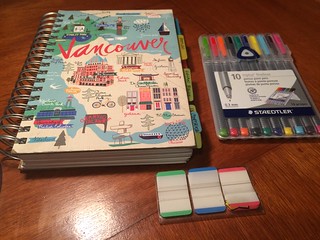
 I am very analog in everything I do, and research activity and workflow planning isn’t the exception. I don’t carry around many planners, nor do I dump everything in a cloud-based service like Evernote: I have a trusty Everything Notebook, where I schedule tasks I have to carry out for my research and teaching and service, write my notes about seminars, courses, readings, capture fieldnotes, and plan my research output.
I literally keep EVERYTHING in my Everything Notebook.
This page captures all the blog posts associated with how I came up with the idea of the Everything Notebook, how I use it, and what are some key ideas to keep it going.
How I use the Everything Notebook to plan my research
This post explains what I use the Everything Notebook for: planning and scheduling my weekly, and daily To-Do lists, as well as maintaining my notes about all my research, projects, students, ideas, papers I’m reading or writing, all in one place.
How I plan my year using an Everything Notebook
This post shows in great detail how I do my annual project and conference planning, and how I integrate this process seamlessly with the Everything Notebook.
How to start and maintain an Everything Notebook
I wrote this post in response to Dr. Veronica Kitchen’s request to explain how the Everything Notebook would work when we write in loose pages, and when we aren’t fully sure of where is each piece of research and/or handwritten notes we’ve taken.
Note-taking techniques II: the Everything Notebook Method
In this post, I discuss how I write on my Everything Notebook, which yes, I use for absolutely everything.
Synchronizing Google Calendar and the Everything Notebook with the Whiteboard Weekly Planner
I am quite analog in everything I do, but in order to be able to remember exactly where I am supposed to be at a certain point in time, I always cross-link my weekly To-Do lists (which are listed in the Everything Notebook) with my Google Calendar, and with my Whiteboard Weekly Planner. This post explains how everything synchronizes.
Should you bring your Everything Notebook virtually everywhere?
The short answer is: if it’s a heavy notebook, like the ones I normally carry around, it’s probably best if you leave it back home and staple pages back to the specific section where they belong when you come home.
What are the differences between the Everything Notebook and the Bullet Journal?
This blog post describes the major differences between the Everything Notebook and the Bullet Journal.
What kinds of things do we (I) write in the Everything Notebook?
This blog post describes the kinds of items that you would put in your Everything Notebook.

What brand(s) of everything notebooks do you like? I am trying to find something like the one shown in a couple of your pictures, which look like it is basic black with white, lined pages that have margins. Also looks like there is a cloth bookmark attached. Thank you!
Your Everything Notebook method is a great reminder that low-tech approaches can be incredibly effective for organizing complex research workflows. I also find that combining analog planning with certain digital tools enhances my productivity. For those interested in how AI can further streamline research discovery and tool selection, I’ve found AI for research tools to be a helpful aggregator of current AI applications across scientific disciplines. It’s worth a look for anyone seeking to integrate new technologies into their research practice.
I really appreciate the detailed breakdown of how you use the Everything Notebook for research planning and scheduling—it’s a great reminder that analog methods can still be incredibly effective for managing complex workflows. For those of us who also juggle multiple projects and languages, integrating language practice into daily routines can be a challenge. I’ve found that adding a structured yet playful approach to studying Mandarin, like the interactive exercises available at learn Chinese through games, helps reinforce vocabulary while keeping the process engaging. It pairs well with your note-taking system for tracking progress in a new skill.
I really appreciate how you describe the Everything Notebook as a central hub for managing research tasks, notes, and planning. It resonates with my own experience of needing a single system to keep track of literature, data, and writing progress. For those of us who also need to produce figures for papers or presentations, I’ve found that integrating a tool like Figcanvas for creating scientific illustrations can complement the analog workflow. It lets you generate publication-ready diagrams, data visualizations, and flowcharts from natural language prompts or by uploading your own data, and the ability to export as SVG for further editing saves hours of manual drafting. It bridges the gap between handwritten notes and polished visual outputs.